A JSON Formatter (also called a JSON beautifier or JSON pretty-printer) is a free online tool that beautifies, validates, and structures JSON data. It catches every JSON syntax error and applies JSON validation rules so your data is clean before it reaches production.
Indentation
Formatting Rules
Privacy & Speed
Local-only processing. Your data never leaves your browser. Optimized for large files up to 50MB.
What is JSON Formatting?
JSON formatting (also called JSON beautifying or pretty-printing) is the process of converting compact, hard-to-read JSON text into a structured, indented layout that developers can scan instantly. Raw JSON returned by APIs or stored in databases is typically minified — all on one line — to save space. A JSON formatter acts as a JSON linter: it parses the input, applies JSON validation rules (RFC 8259), and re-serialises it with consistent indentation so objects, arrays, keys, and values become immediately visible. If the input contains a JSON syntax error, use our JSON validator and syntax checker to pinpoint the exact line and character position of the problem.
Features of OpenFormatter JSON Formatter
- lock100% client-side — your JSON never leaves the browser. No server upload, no data logging, no privacy risk.
- format_align_leftInstant pretty-print with 2-space, 4-space, or tab indentation — choose the style that matches your codebase.
- verifiedBuilt-in validator — syntax errors are caught and reported the moment you click Beautify.
- compressOne-click minification strips all whitespace for compact production payloads.
- downloadDownload formatted output as a .json file or copy it straight to your clipboard.
When to Use JSON Formatter
API Debugging
Paste a raw API response and instantly see the full data structure, nested objects, and missing fields.
Config Files
Clean up package.json, tsconfig, or .eslintrc files with consistent indentation before committing.
Validation
Catch trailing commas, unquoted keys, and other syntax errors before they break your build or API call.
JSON Formatter Example
Paste minified JSON on the left — the formatter outputs clean, indented JSON on the right.
Before Formatting
{"name":"John","age":30,"address":{"city":"New York","zip":"10001"}}After Formatting
{
  "name": "John",
  "age": 30,
  "address": {
    "city": "New York",
    "zip": "10001"
  }
}
FAQs
Is it safe to paste sensitive JSON here?expand_more
What is the difference between a JSON formatter and a JSON validator?expand_more
Can I format large JSON files?expand_more
What indentation should I use — 2 spaces or 4?expand_more
Does formatting change my data?expand_more
What is a JSON Formatter?
A JSON formatter (also called a JSON beautifier, JSON linter, or JSON pretty-printer) is a tool that takes raw or minified JSON text and reformats it with consistent indentation, line breaks, and spacing so it becomes human-readable. You can format JSON using our tool above — just paste and click Beautify.
JSON (JavaScript Object Notation) is the standard data format for APIs, configuration files, and data storage. While machines handle compact JSON efficiently, developers need formatted JSON to read, debug, and review data structures quickly. Need to check correctness first? Use our free JSON validator to detect any JSON syntax errors before formatting.
OpenFormatter's JSON formatter runs 100% in your browser — no server upload, no data exposure, instant results even for large files. It applies standard JSON validation rules on every parse, so invalid input is caught immediately rather than silently corrupting your output.
Pretty-print
Adds indentation and line breaks for readability
Validate
Catches syntax errors before they reach production
Minify
Strip whitespace for compact transport payloads
Export
Download formatted JSON as a .json file
Why Use an Online JSON Formatter
From debugging API responses to reviewing config files, a JSON formatter is one of the most-reached-for tools in a developer's daily workflow. You can format JSON using our tool above, then copy or download the result. Need the reverse? Use our free JSON minifier tool to compress formatted JSON back into a single line. You can also browse JSON examples by use case to see common patterns before writing your own.
API Debugging
REST and GraphQL APIs return minified JSON payloads. Paste the raw response into the formatter to instantly see the full data structure, spot missing fields, and verify that your API contract matches expectations.
Log Analysis
Modern applications emit structured JSON logs — from Node.js servers, Lambda functions, and cloud platforms. Formatting these one-liners makes it practical to trace errors, correlate request IDs, and understand event sequences.
Config Files
package.json, tsconfig.json, .eslintrc, and other config files need to stay readable as projects grow. Run them through the formatter to fix inconsistent indentation and catch syntax errors before they break your build.
How to Format JSON Online
Formatting happens in three stages — parse, transform, serialize.
Parsing
The input string is parsed into an in-memory object tree using the browser's native JSON.parse(). This step validates the syntax and catches errors like missing quotes, trailing commas, or mismatched brackets.
JSON.parse('{"name":"Alice","age":30}')Optional Transforms
Optional rules are applied to the parsed object — removing null values, sorting keys alphabetically, or flattening nested structures — before serialization.
JSON.parse(JSON.stringify(obj, (k,v) => v ?? undefined))Serialization
The object is serialized back to a string using JSON.stringify() with an indentation argument (2 or 4 spaces), producing the formatted output instantly.
JSON.stringify(parsed, null, 2)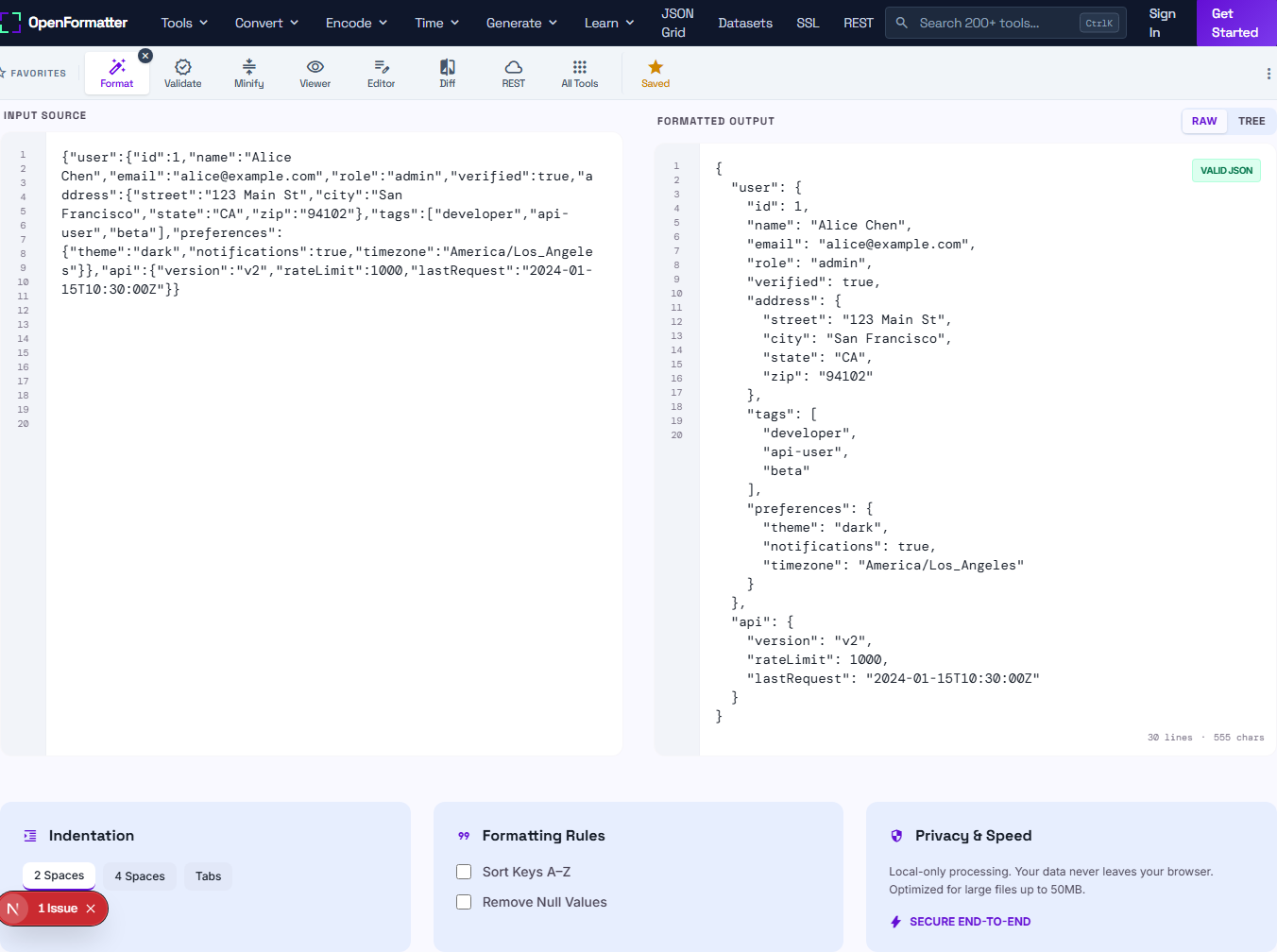
JSON Formatter vs Validator vs Viewer
These three tools are related but serve distinct purposes. Here's when to reach for the validate JSON online tool or the free JSON Viewer tool instead of this formatter:
| Tool | Primary Purpose | Output | Best For |
|---|---|---|---|
| JSON FormatterThis tool | Beautify / pretty-print | Indented, readable JSON string | Making minified JSON human-readable |
| JSON Validator | Check syntax correctness | Pass / fail with error location | Verifying JSON before deploying or sending to an API |
| JSON Viewer | Browse structure interactively | Collapsible tree UI | Exploring deeply nested or large JSON structures |
JSON Beautifier vs Minifier
Both tools transform JSON — but in opposite directions. Knowing when to use each one will save you debugging time and reduce API overhead.
JSON Beautifier
Also called: formatter, pretty-printer
- check_circleAdds indentation, line breaks, and spacing
- check_circleMakes nested structures immediately readable
- check_circleIncreases file size (whitespace overhead)
- check_circleUsed during development, debugging, and code review
- check_circleInput: {"name":"Alice","age":30}
{ "name": "Alice", "age": 30 }
JSON Minifier
Also called: compressor, JSON minify
- check_circleStrips all whitespace, line breaks, and indentation
- check_circleProduces the smallest possible JSON string
- check_circleReduces payload size for faster API responses
- check_circleUsed before deploying to production or sending over the wire
- check_circleOutput: {"name":"Alice","age":30}
{"name":"Alice","age":30}
Rule of thumb: beautify when you're reading JSON, minify when you're sending it. Use the online JSON minifier if you need to compress output after formatting.
Common JSON Errors
These are the most frequent causes of invalid JSON. Each invalid JSON example below includes the exact error and the corrected version. Paste your broken JSON into the formatter above — it will highlight the error location. For a dedicated error report with line numbers and a full guide, visit our JSON errors guide or try the JSON syntax checker. Note: these tools check syntax validity only — for JSON schema validation (type-level checking against a schema definition), you need a dedicated JSON Schema validator.
Trailing comma
JSON does not allow a comma after the last element in an object or array. This is valid JavaScript but invalid JSON.
Invalid
{"name": "Alice", "age": 30,}Valid
{"name": "Alice", "age": 30}Unquoted keys
All object keys must be enclosed in double quotes. Single quotes and unquoted keys are not valid JSON.
Invalid
{name: "Alice", age: 30}Valid
{"name": "Alice", "age": 30}Single quotes
String values must use double quotes. Single-quoted strings are JavaScript syntax, not valid JSON.
Invalid
{"name": 'Alice'}Valid
{"name": "Alice"}Undefined / NaN / Infinity
JSON only supports null for absence of value. JavaScript-specific values like undefined, NaN, and Infinity are not valid JSON.
Invalid
{"value": undefined, "score": NaN}Valid
{"value": null, "score": null}Comments
JSON does not support comments. Use JSON5 or JSONC if you need comments in config files.
Invalid
{"name": "Alice" // user name}Valid
{"name": "Alice"}JSON Formatting Examples
Simple Object
Minified input
{"user":{"id":1,"name":"Alice","role":"admin","active":true}}Formatted output
{
  "user": {
    "id": 1,
    "name": "Alice",
    "role": "admin",
    "active": true
  }
}
Array of Objects
Minified input
[{"id":1,"name":"Alice"},{"id":2,"name":"Bob"},{"id":3,"name":"Charlie"}]Formatted output
[
  { "id": 1, "name": "Alice" },
  { "id": 2, "name": "Bob" },
  { "id": 3, "name": "Charlie" }
]
API Response
Minified input
{"status":"success","data":{"token":"eyJhbGc...","expires_in":3600},"meta":{"request_id":"abc123","timestamp":1704067200}}Formatted output
{
  "status": "success",
  "data": {
    "token": "eyJhbGc...",
    "expires_in": 3600
  },
  "meta": {
    "request_id": "abc123",
    "timestamp": 1704067200
  }
}API Debugging Guide
When an API request fails or returns unexpected data, a JSON formatter is the fastest way to understand what went wrong. Here's a repeatable debugging workflow:
Capture the raw response
Copy the raw response body from your browser's DevTools (Network tab → select request → Response tab), Postman, or curl output.
curl -s https://api.example.com/users | pbcopyPaste and format
Paste into the formatter above and click Beautify. If it errors, the JSON itself is malformed — check for encoding issues or truncated responses.
Inspect structure
Look for unexpected null values, empty arrays, missing fields, or wrong data types. These are often the root cause of client-side errors.
Compare against schema
Copy the expected shape from your API docs or TypeScript types and compare side-by-side with the actual response. Field name mismatches (camelCase vs snake_case) are common.
Validate before sending
If you're crafting a request body, format and validate it before sending to avoid 400 Bad Request errors caused by malformed JSON.
Use the JSON Validator tab for strict schema checkingPro tip: For large API responses (>10MB), use the Upload button in the toolbar to load your JSON file directly — it's faster than pasting and avoids browser clipboard limits.
Frequently Asked Questions
What is a JSON formatter?expand_more
Is this JSON formatter free?expand_more
Is my data safe? Does it get uploaded to a server?expand_more
What's the difference between a JSON formatter and a JSON beautifier?expand_more
Can I format invalid JSON?expand_more
What indentation should I use — 2 spaces or 4 spaces?expand_more
How do I format JSON in JavaScript?expand_more
How do I format JSON in Python?expand_more
Can this format large JSON files?expand_more
What's the difference between JSON and JSON5?expand_more
Why does my formatted JSON look different from the original?expand_more
Format JSON from the Terminal
Need to format JSON without leaving your terminal? Here are the fastest one-liners for every platform — no extra tools required for Python and Node.js. For piping API responses, jq is the standard choice.
Format a file
python3 -m json.tool data.jsonPipe from stdin
echo '{"name":"Alice"}' | python3 -m json.toolWrite formatted to new file
python3 -m json.tool data.json > pretty.jsonFormat a file
node -e "const fs=require('fs');console.log(JSON.stringify(JSON.parse(fs.readFileSync('data.json','utf8')),null,2))"One-liner for a JSON string
node -e "process.stdout.write(JSON.stringify(JSON.parse(require('fs').readFileSync('/dev/stdin','utf8')),null,2))" < data.jsonFormat a file
jq . data.jsonPipe curl API response
curl -s https://api.example.com/users | jq .Extract a field
curl -s https://api.example.com/users | jq '.[0].name'Install on macOS
brew install jqcurl + python
curl -s https://api.example.com/data | python3 -m json.toolcurl + jq (recommended)
curl -s https://api.example.com/data | jq .curl with headers
curl -s -H 'Authorization: Bearer TOKEN' https://api.example.com/me | jq .How to Format JSON in Your Language
Every major language has a built-in JSON library. Here are the exact functions to pretty-print JSON with consistent indentation — no third-party package needed.
// Format a JSON string
const formatted = JSON.stringify(JSON.parse(raw), null, 2);

// Format an existing object
const formatted = JSON.stringify(myObject, null, 2);

// Write formatted JSON to a file (Node.js)
const fs = require('fs');
fs.writeFileSync('out.json', JSON.stringify(data, null, 2));import json
# Format a JSON string
formatted = json.dumps(json.loads(raw_str), indent=2)
# Format a Python dict
formatted = json.dumps(my_dict, indent=2)
# Read, format, and write a JSON file
with open('data.json') as f:
data = json.load(f)
print(json.dumps(data, indent=2))import (
"encoding/json"
"bytes"
)
// Indent a JSON []byte
var out bytes.Buffer
json.Indent(&out, rawJSON, "", " ")
fmt.Println(out.String())
// Marshal with indentation
b, _ := json.MarshalIndent(myStruct, "", " ")// Using Jackson
ObjectMapper mapper = new ObjectMapper();
mapper.enable(SerializationFeature.INDENT_OUTPUT);
String formatted = mapper.writeValueAsString(myObject);
// Parse and re-format a JSON string
Object obj = mapper.readValue(rawJson, Object.class);
String pretty = mapper.writerWithDefaultPrettyPrinter()
.writeValueAsString(obj);// Format a JSON string
$formatted = json_encode(
json_decode($rawJson),
JSON_PRETTY_PRINT | JSON_UNESCAPED_UNICODE
);
// Format and save to file
file_put_contents('out.json', json_encode(
json_decode(file_get_contents('data.json')),
JSON_PRETTY_PRINT
));use serde_json::Value;
// Parse then pretty-print
let v: Value = serde_json::from_str(&raw_json)?;
let pretty = serde_json::to_string_pretty(&v)?;
// Pretty-print a struct
#[derive(Serialize)]
struct User { name: String }
let pretty = serde_json::to_string_pretty(&user)?;JSON Syntax Cheat Sheet
A complete reference to valid JSON syntax — bookmark this when you need to verify what's allowed and what isn't. JSON is defined by RFC 8259.
Valid JSON Value Types
| Type | Example |
|---|---|
| String | "Hello, world!" |
| Number | 42 / 3.14 / -7 / 1.5e3 |
| Boolean | true / false |
| Null | null |
| Array | [1, "two", true, null] |
| Object | {"key": "value"} |
Key Rules
Invalid JSON
{
  name: "Alice",          // key not quoted
  'role': 'admin',        // single quotes
  "score": NaN,           // NaN not allowed
  "tags": ["a", "b",],   // trailing comma
  // this is a comment   // no comments in JSON
}
Valid JSON
{
  "name": "Alice",
  "role": "admin",
  "score": null,
  "tags": ["a", "b"],
  "active": true
}
See the JSON Syntax reference for the complete grammar behind these rules.
JSON vs XML, YAML, CSV — Which Should You Use?
JSON is the dominant format for APIs and config files, but it's not always the right choice. Here's how it compares against the other formats you'll encounter in real projects. See What is JSON? for the fuller history of why it overtook XML for most APIs.
| Format | Best For | Strengths | Weaknesses |
|---|---|---|---|
| JSONThis tool | REST APIs, config files, NoSQL databases | Native to JavaScript, compact, human-readable, universal parser support | No comments, no schema enforcement, verbose for tabular data |
| XML | Enterprise systems, SOAP APIs, document formats (SVG, RSS) | Attributes + elements, XSLT transformations, mature tooling, namespace support | Verbose, harder to parse, slower, poor JavaScript ergonomics |
| YAML | Config files (Docker, GitHub Actions, Kubernetes), human-authored data | Comments allowed, minimal syntax, very human-readable | Whitespace-sensitive (indent errors silently break files), slow parsers, complex spec |
| CSV | Tabular data, spreadsheets, data pipelines, analytics exports | Extremely compact, Excel/Google Sheets compatible, fast to parse | Flat structure only (no nesting), no types, no standard for special chars |
| Protocol Buffers | High-performance internal APIs, microservices (gRPC) | 3–10× smaller than JSON, typed, faster serialization | Binary (not human-readable), requires schema file, limited browser support |
Use JSON when…
- check_circleBuilding a REST or GraphQL API
- check_circleStoring data in MongoDB or PostgreSQL JSONB
- check_circleWriting config files for JS/TS tooling
- check_circleExchanging data between any two modern services
Use YAML when…
- check_circleWriting CI/CD pipeline configs (GitHub Actions, GitLab)
- check_circleAuthoring Kubernetes or Docker Compose files
- check_circleYou need human-readable configs with comments
Use CSV when…
- check_circleExporting reports or analytics data
- check_circleSharing flat tabular data with non-developers
- check_circleImporting data into spreadsheets or databases in bulk
Handling Large JSON Files
This formatter handles files up to ~50MB entirely in your browser. For larger files, different strategies apply depending on the source and target. Here's a decision framework used by data engineers and backend developers.
| File Size | Best Approach | Tool / Command |
|---|---|---|
| < 5 MB | Browser-based formatter (this tool) | Paste or upload — formats instantly |
| 5–50 MB | Browser upload (recommended) | Use the Upload button; avoids clipboard limits |
| 50–500 MB | Terminal with jq or python | jq . large.json > pretty.json |
| 500 MB+ | Streaming parser or chunking | jq -c . large.json (compact + stream) |
| Any size (API) | Request paginated responses | Add ?page=1&limit=100 to API calls |
Strategies for Very Large JSON
Use NDJSON (Newline-Delimited JSON) for streaming
Instead of one giant JSON array, emit one JSON object per line. Each line is independently parseable. This is the standard format for log ingestion (Datadog, Elasticsearch, BigQuery streaming inserts) and avoids loading the entire file into memory.
{"id":1,"event":"click"}
{"id":2,"event":"scroll"}
{"id":3,"event":"purchase"}Compress JSON payloads with gzip
JSON compresses extremely well with gzip because of repetitive key names. A typical API response compresses 5–10×. Enable gzip on your server and send Accept-Encoding: gzip from clients. JSON over gzip is usually smaller than equivalent Protocol Buffers without compression.
# Node.js: compress JSON response
res.setHeader("Content-Encoding", "gzip");
res.end(zlib.gzipSync(JSON.stringify(data)));Paginate API responses — never return unbounded arrays
Any API endpoint that returns an array should support pagination. The de facto standard is cursor-based pagination (safer than offset for large datasets) using next_cursor fields. This keeps each JSON response small and fast.
{
  "data": [...],
  "meta": {
    "next_cursor": "eyJpZCI6MTAwfQ==",
    "has_more": true
  }
}Use JSON Schema to validate structure before processing
Before parsing a large JSON file, validate its structure against a JSON Schema. This catches malformed data early without reading every record — critical for data pipelines that process millions of rows. Tools: Ajv (JavaScript), jsonschema (Python), everit-org/json-schema (Java).
const Ajv = require("ajv");
const ajv = new Ajv();
const valid = ajv.validate(schema, data);
if (!valid) console.log(ajv.errors);
Developer Insights
From the Blog
How to Use a JSON Formatter: The Complete Guide
Everything about JSON formatters — how they work, when to use them, and what to look for in a good online JSON beautifier.
Why JSON Formatting Matters More Than You Think
How proper JSON structure prevents production bugs, improves debugging, and makes code reviews faster.
The Case for 100% Client-Side Data Processing
Why we built OpenFormatter to process all data locally, and what that means for your workflow security.
Part of the JSON Toolkit
Explore All JSON Tools
Free online tools for every JSON task — format, validate, convert, compare, and more.