XML to Table Converter Online — Free Visual XML Table

Paste XML — RSS feeds, configuration files, SOAP responses, sitemap.xml — and render repeated elements as a sortable, filterable HTML table.

search
Paste XML above or click Load Sample to render a table.

What is an XML to Table converter?

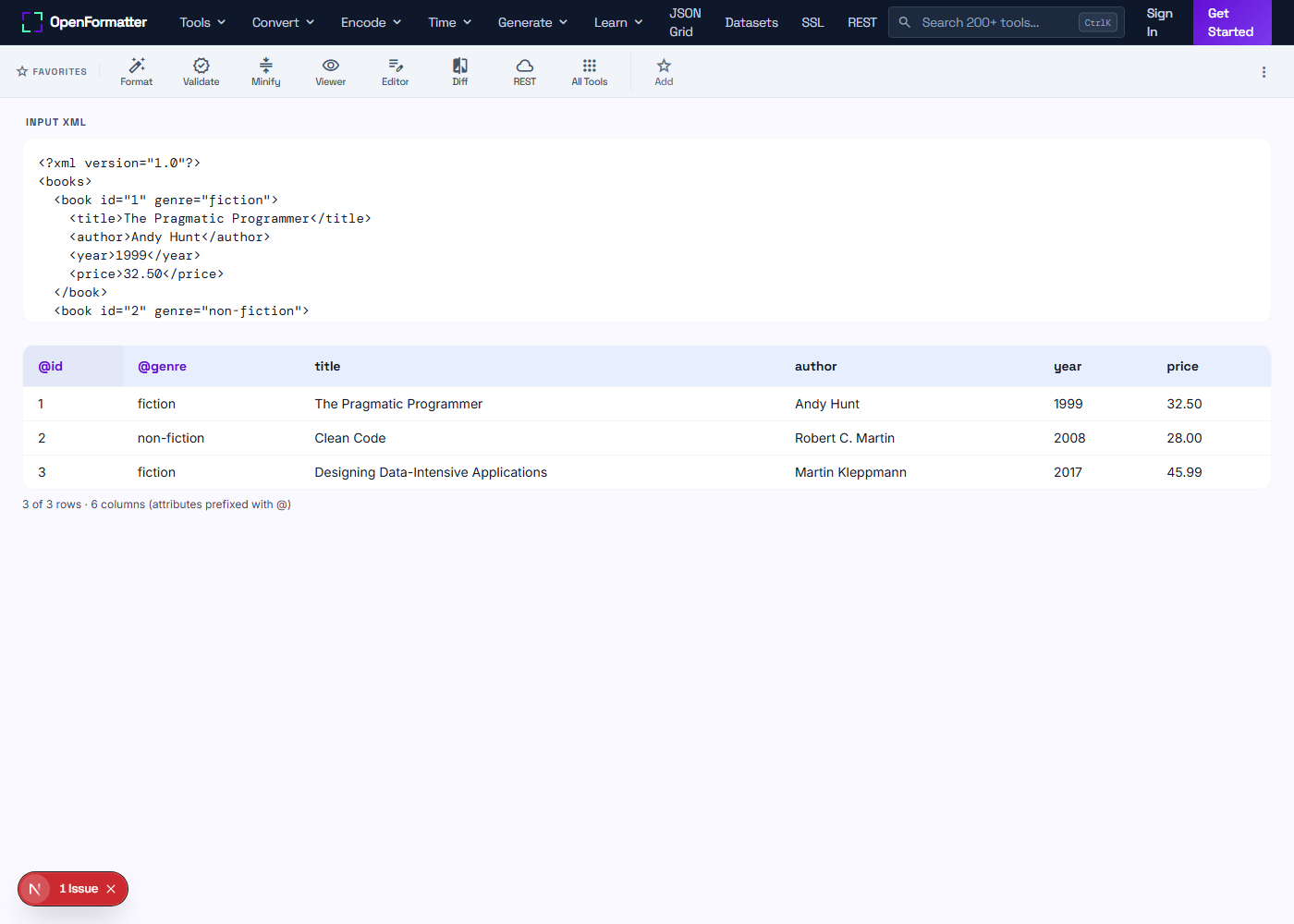
An XML to table converter takes an XML document — RSS feed, sitemap, SOAP response, configuration file — and renders the repeated record elements as a flat HTML table. Each child element of the root becomes a row; attributes and leaf children become columns.

XML carries structure that is great for machines but verbose for humans. A table flips XML on its side so that each record sits on one row and you can sort, filter, and export to CSV/TSV without writing XSLT.

How to convert XML to a table — 4 steps

  1. Paste XML. Drop a document whose root contains repeated child elements (the most common shape: <books><book/>…</books>).
  2. Inspect the table. Attributes show as @name columns (highlighted) and leaf children show by tag name.
  3. Sort and filter. Click headers to sort. Type in the filter box for a substring match across every cell.
  4. Export. Copy as TSV for Excel, or as JSON for downstream scripts.

Sample input and output

<books>
  <book id="1" genre="fiction">
    <title>The Pragmatic Programmer</title>
    <year>1999</year>
  </book>
  <book id="2" genre="fiction">
    <title>Clean Code</title>
    <year>2008</year>
  </book>
</books>

renders to a 2-row table with columns @id, @genre, title, year.

Sortable Columns

Click any column header to sort ascending or descending. Numeric values use natural ordering — version "1.10" sorts after "1.9".

Live Filter

A single substring filter checks every cell across every column, including the @attribute columns, and updates the view in real time.

Copy / Export

Copy as TSV for Excel or as JSON for further processing. The export reflects current sort and filter — only what you see ships out.

Common use cases

  • check_circleBrowsing RSS / Atom feed entries as a sortable table by date or author
  • check_circleInspecting sitemap.xml entries to find URL counts, lastmod, priority
  • check_circleReviewing SOAP envelope record arrays during integration debugging
  • check_circleAuditing configuration files (e.g. log4j2.xml, web.xml) by element type
  • check_circleExploring legacy enterprise XML exports (Oracle, SAP, Salesforce dumps)
  • check_circleConverting XML rows to CSV without writing XSLT or running xsltproc
  • check_circleCounting elements that match a filter — quick sanity checks during migrations
  • check_circleSharing XML data with stakeholders who only read spreadsheets

How the conversion works

The browser's built-in DOMParser with application/xml mode parses your input. The tool then groups direct children of the root by tag name and picks the largest group as the row set — a heuristic that handles 95% of real XML. For each row, attributes become @name columns and leaf children (those without their own children) become columns by tag name. Nested children are shown as a [tagname] placeholder so the table stays readable; for full flattening, run XML to JSON first.

Need to do more with XML?

Format, validate, and convert XML with the rest of OpenFormatter's XML toolkit.

Frequently Asked Questions

How are XML attributes handled?

Attributes are promoted to columns prefixed with @. So <book id="1" genre="fiction"> contributes columns @id and @genre. Child element columns appear without a prefix, so an attribute named id and a child named id never collide in the table.

What if the XML has no repeated elements?

The tool looks at the root element's direct children and picks the most frequent tag name as the "row" element. If the root has only unique children, you will see a one-row-per-child table — useful but not ideal. For deeply nested XML, run it through XML to JSON first and wrap the relevant array.

Are nested child elements expanded?

Only leaf children (those with text content and no further children) are rendered as cell values. Children that themselves contain elements are shown as a [tagname] badge so the table stays scannable. Convert to JSON to flatten further.

Does it support XML namespaces?

Yes — DOMParser preserves namespaces, and the prefixed tag (e.g. ns:title) becomes the column name. If your XML uses namespaces purely for validation and you don't need them in the output, strip them with a simple regex before pasting.

Why does my XML show "parsererror"?

The browser's DOMParser is strict — unbalanced tags, illegal characters, or missing root elements all fail. Run your XML through an XML validator or formatter first to fix the issue, then re-paste.

Can I copy the table to Excel?

Yes. Click Copy as TSV and paste directly into Excel, Google Sheets, or Numbers — each cell lands in its own column. Tabs and newlines inside values are escaped to spaces so the row count stays correct.

Is the XML uploaded to your servers?

No. Parsing happens in your browser via DOMParser. You can verify in DevTools Network tab that no requests are made when you paste XML or click Load Sample.

Can I export as JSON?

Yes — the Copy as JSON button serialises the current sorted/filtered rows as a JSON array of flat objects, ideal for piping into another script or pasting into a JSON viewer.
XML to Table Converter Online — Free Visual XML Table