OpenAPI to YAML — JSON Spec to YAML Converter

Convert OpenAPI / Swagger JSON specifications to clean block-style YAML. Supports OpenAPI 3.0, 3.1, and Swagger 2.0 — entirely in your browser.

What is OpenAPI / Swagger?

The OpenAPI Specification (formerly Swagger) is the de-facto standard for describing HTTP APIs. Swagger 2.0 launched in 2014, was donated to the Linux Foundation, and renamed OpenAPI 3.0 in 2017. OpenAPI 3.1 (2021) aligned the schema dialect with JSON Schema 2020-12, unifying API and data validation tooling. The spec can be authored in JSON or YAML — most teams prefer YAML for the source-of-truth and JSON for tooling consumption.

YAML wins for human editing: comments, no quote noise, and visual indentation. JSON wins for automated tooling: every parser supports it, no whitespace ambiguity, no anchor / merge surprises. This converter goes from JSON to YAML in one click — useful when you receive a JSON spec from a vendor and want to maintain it as YAML in your repo.
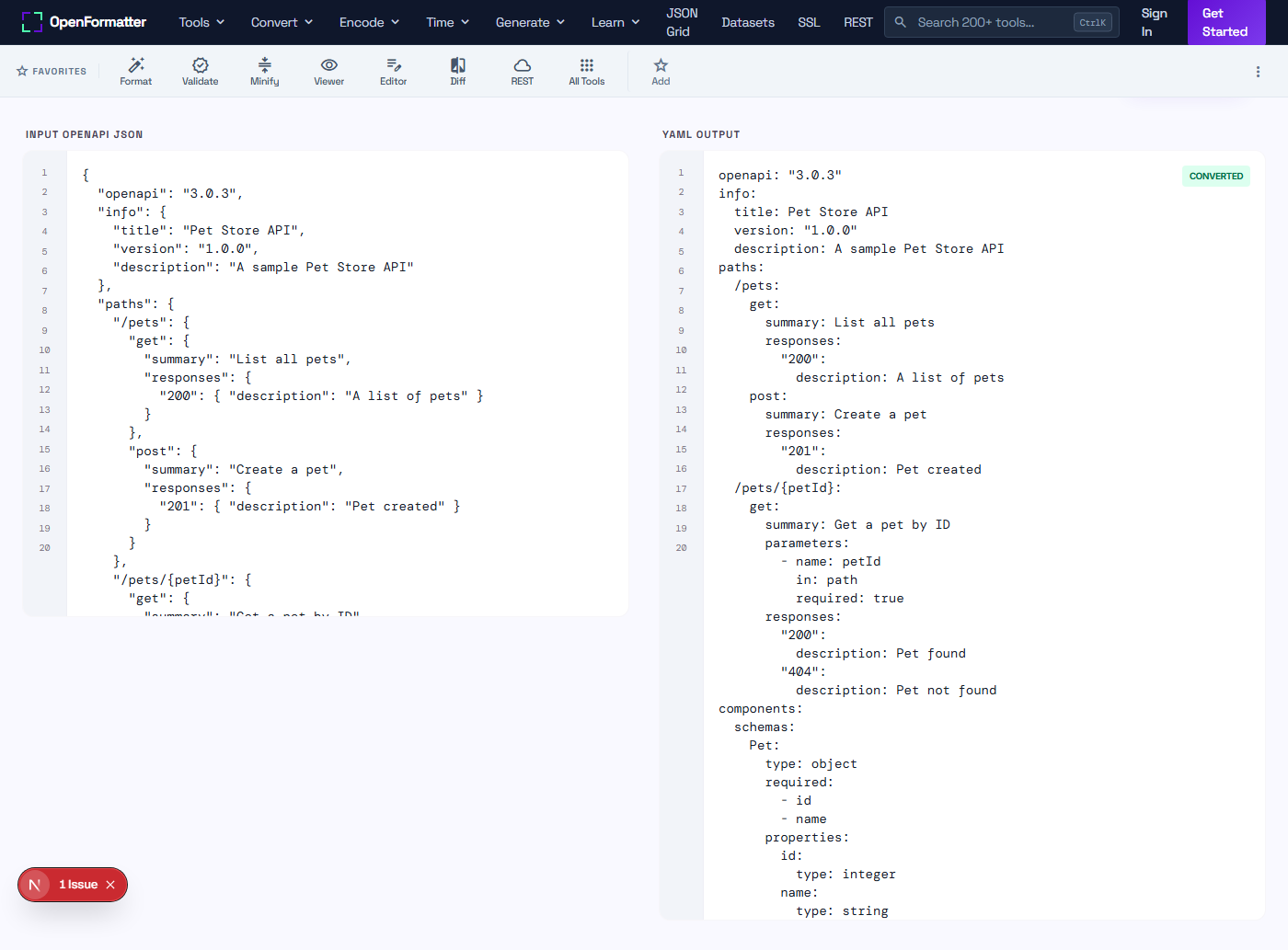
How to convert OpenAPI JSON to YAML — 4 steps

  1. Paste OpenAPI JSON. Copy your openapi.json into the Input panel above. Click Load Sample for a Pet Store demo.
  2. Click Convert. The tool parses the JSON and emits clean block-style YAML.
  3. Review the YAML. Paths, schemas, components, and security definitions map 1:1 with the source.
  4. Save it. Copy the YAML into your repo as openapi.yaml, or paste into Swagger Editor for live editing.

Sample input and output

Input — Pet Store JSON

{
  "openapi": "3.0.3",
  "info": { "title": "Pet Store", "version": "1.0.0" },
  "paths": {
    "/pets": {
      "get": {
        "summary": "List pets",
        "responses": { "200": { "description": "OK" } }
      }
    }
  }
}

Output — YAML

openapi: "3.0.3"
info:
  title: Pet Store
  version: "1.0.0"
paths:
  /pets:
    get:
      summary: List pets
      responses:
        "200":
          description: OK

JSON to YAML

Block-style output with 2-space indentation. Strings that look like numbers or booleans are quoted automatically to preserve type.

OpenAPI 3.0, 3.1, Swagger 2.0

Spec-version agnostic. Works for any structurally valid OpenAPI / Swagger JSON document.

Client-Side Only

Runs in your browser. Specs with example tokens, internal hostnames, or proprietary schemas never leave your device.

Common use cases

  • check_circleMigrating a vendor JSON spec into your YAML-first git repo
  • check_circleGenerating human-friendly docs to share with frontend, QA, or partner teams
  • check_circleAuthoring contract tests in YAML for Pact, Dredd, or Schemathesis
  • check_circleProducing readable diffs in pull requests — YAML diffs read better than JSON diffs
  • check_circleImporting the spec into Stoplight Studio, which prefers YAML
  • check_circleEmbedding the spec in Helm chart values or Kustomize overlays
  • check_circleValidating in CI with spectral or redocly — both accept YAML and JSON
  • check_circleShipping the spec alongside SDK source code for reference

Swagger 2.0 vs OpenAPI 3.0 vs OpenAPI 3.1 vs AsyncAPI

SpecYearSchema dialectUse for
Swagger 2.02014Custom subsetLegacy APIs; still common in enterprise
OpenAPI 3.02017JSON Schema (subset)Modern REST APIs; widest tooling
OpenAPI 3.12021JSON Schema 2020-12New projects; webhooks, full JSON Schema
AsyncAPI2017JSON SchemaEvent-driven / message-based APIs

Need the reverse direction or a validator?

Convert YAML back to JSON, or validate your spec for missing fields and broken $refs.

Frequently Asked Questions

Why convert OpenAPI JSON to YAML?

YAML is far more readable for humans editing an API spec — comments are supported, indentation conveys structure, and there is no quote / brace noise. Most teams keep the source-of-truth in YAML and convert to JSON only for tooling that requires it.

Does this support OpenAPI 3.1?

Yes. The converter is version-agnostic — it walks the JSON object tree and emits YAML, so it works for Swagger 2.0, OpenAPI 3.0.x, and OpenAPI 3.1 alike.

Are $ref pointers preserved?

$ref strings are passed through unchanged. The converter does not dereference or inline them. If you want a fully bundled spec, run swagger-cli bundle or redocly bundle locally first.

How are paths like /pets/{petId} encoded?

Path keys with curly braces are quoted in YAML to avoid ambiguity with flow-style mappings — exactly how spec authors hand-write them. The output is valid OpenAPI YAML.

Will my JSON be uploaded to a server?

No. Conversion runs in JavaScript in your browser. Open DevTools Network tab and verify — no request is made when you click Convert. Specs with example tokens or internal hostnames stay on your device.

Why does my YAML output use double quotes around some strings?

Strings that look like booleans (yes, no, true), numbers, null, or contain YAML special characters (: # [ ] { } & * | > ! % @) are quoted automatically to preserve the value. This is the safe encoding strategy used by js-yaml and PyYAML.

How is the YAML indented?

Output uses 2-space indentation, the OpenAPI / Swagger / Kubernetes convention. Block-style maps and sequences are produced — no flow-style braces in the output (except for explicitly empty objects and arrays).

Can I convert a Swagger 2.0 JSON file?

Yes. Swagger 2.0 (using the swagger: "2.0" field) is just JSON — the converter treats it the same way and emits valid Swagger 2.0 YAML.

OpenAPI to YAML Converter — JSON Spec to YAML Online